
Web application security is crucial for businesses and organizations of all sizes. A breach in security can lead to the loss of sensitive data, financial damage, and loss of reputation. That’s where the Open Web Application Security Project (OWASP) comes in.
OWASP is a nonprofit organization that works to improve the security of software. It provides resources and tools for developers and security professionals to build and maintain secure systems.
In this article, we’ll take a look at 10 OWASP best practices that can help you build and maintain secure web applications.
1. Implement strong authentication and password policies:
Use strong passwords and implement multi-factor authentication to protect against brute-force attacks. Strong passwords should be at least 12–15 characters long and include a mix of upper and lowercase letters, numbers, and special characters. Multi-factor authentication (MFA) adds an additional layer of security by requiring users to provide two or more forms of identification, such as a password and a fingerprint or a password and a one-time code sent to a mobile device.
2. Implement proper access controls:
Ensure that users have the least privilege necessary to perform their duties. This will minimize the damage that can be done if an attacker gains access to a user’s account. This can be done by implementing role-based access controls (RBAC) that assign different levels of access to different groups of users. This way, even if an attacker gains access to a user’s account, they will only have access to the resources that the user is authorized to access.
3. Regularly patch and update software:
Keep all software up to date with the latest security patches to protect against known vulnerabilities. Software vendors often release patches to fix known security vulnerabilities, so it’s important to keep your software up to date to protect against these issues.
4. Encrypt sensitive data:
Use encryption to protect sensitive data in transit and at rest. Encryption is the process of converting plain text into a coded form that can only be read by someone with the appropriate decryption key. This is important to protect sensitive data such as credit card numbers, personal information, and login credentials from being intercepted or stolen.
5. Use input validation and sanitization:
Validate and sanitize all user input to prevent injection attacks. Input validation is the process of ensuring that user input meets the constraints of the application. This can help prevent attacks such as SQL injection and cross-site scripting (XSS). Sanitization is the process of cleaning user input to remove any potentially dangerous characters or content.
6. Implement secure communication:
Use secure communication protocols such as HTTPS to protect data in transit. HTTPS encrypts data in transit between the client and server, preventing attackers from intercepting sensitive information such as login credentials or credit card numbers.
7. Protect against injection attacks:
Use prepared statements and parameterized queries to protect against injection attacks. Injection attacks are a common method of exploiting vulnerabilities in web applications by injecting malicious code into input fields. Prepared statements and parameterized queries can help prevent this by ensuring that user input is properly sanitized and handled.
8. Use appropriate error handling and logging:
Properly handle errors and log relevant information to help detect and debug security issues. This includes logging all errors, including stack traces and input data, and setting up alerts to notify the appropriate parties when a security-related error occurs.
9. Implement security in the development process:
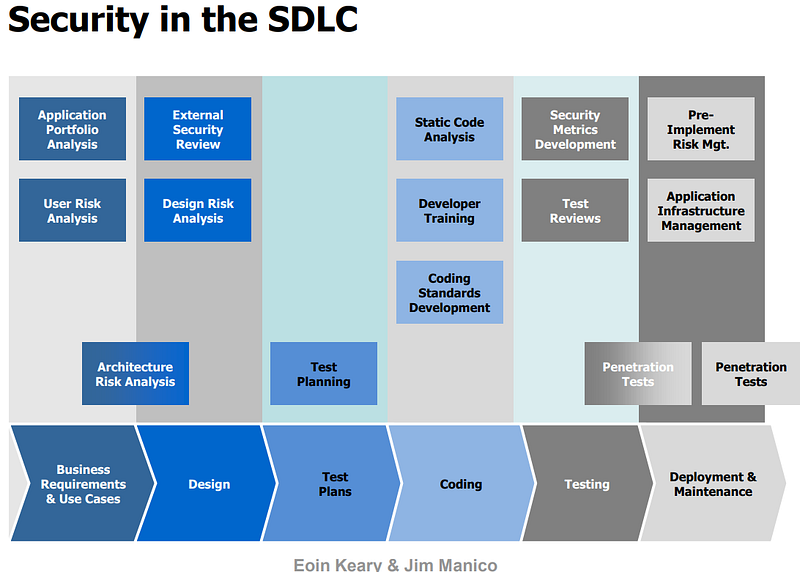
Incorporate security into the development process from the start, rather than as an afterthought. This can be done by implementing a secure software development lifecycle (SDLC) that includes security requirements, design, testing, and deployment. (See: OWASP in SDLC)
10. Conduct regular security testing:
Regularly test your application for vulnerabilities using tools such as those provided by OWASP. (See the list here) This includes penetration testing, in which a simulated attack is launched against your application to identify vulnerabilities, and vulnerability scanning, which uses automated tools to scan your application for known vulnerabilities.