
A well-written Pull Request (PR) can make the review process smoother, faster, and more efficient. One way to ensure your PRs are well-written is to use a Pull Request template. In this article, we will discuss Pull Request templates and how to create them in GitHub.
Pull request templates can help your developers create great pull request descriptions that meet your organization’s standards.
What is a Pull Request template?
Pull Request templates are pre-defined text files(Markdown) that contain guidelines and suggestions for writing a good PR. The templates can include fields like “Description”, “Changes Made”, “How Has This Been Tested?”, and “Checklist”. These fields help ensure that all necessary information is included in your PR and make the review process easier for your team.
Why do we need them?
Using Pull Request templates can save you time and effort when writing PRs. The templates provide a standard structure that makes it easier to write clear, concise, and complete PRs. They also ensure that all necessary information is included, reducing the need for back-and-forth communication between you and your team.
How to create in GitHub?
Create a Markdown file, name it PULL_REQUEST_TEMPLATE.md, and place it in the project’s root folder. (See example here)
Once you’ve created the template, it will be automatically displayed to users when they create a new Pull Request in the repository. You can customize the template to include the fields that are most relevant to your team and your project.
Here is an example Template:
## Description

Please include a summary of the change and which issue is fixed. Please also include relevant motivation and context. List any dependencies that are required for this change.

Fixes # (issue)

## Types of changes

What types of changes does your code introduce to the project?

- [ ] Bug fix (non-breaking change which fixes an issue)
- [ ] New feature (non-breaking change which adds functionality)
- [ ] Breaking change (fix or feature that would cause existing functionality to not work as expected)

## How Has This Been Tested?

Please describe the tests that you ran to verify your changes. Provide instructions so we can reproduce. Please also list any relevant details for your test configuration

- [ ] Test A
- [ ] Test B

## Checklist:

- [ ] Code follows the project's coding style
- [ ] Self-reviewed the code
- [ ] Added relevant comments to the code, particularly in complex areas
- [ ] Made corresponding changes to the documentation
- [ ] Changes generate no new warnings
- [ ] Added relevant unit tests to test the changes
- [ ] All unit tests pass locally with the changes
- [ ] No dependent changes are required to be merged or published
You can use this template as a starting point and modify it to fit your specific project’s requirements. Especially for the “Checklist” part, you should take your time and define a checklist based on your programming language, project’s needs, scope, etc. (Maybe I can write about it in the future…)
An example of PR that uses this template:
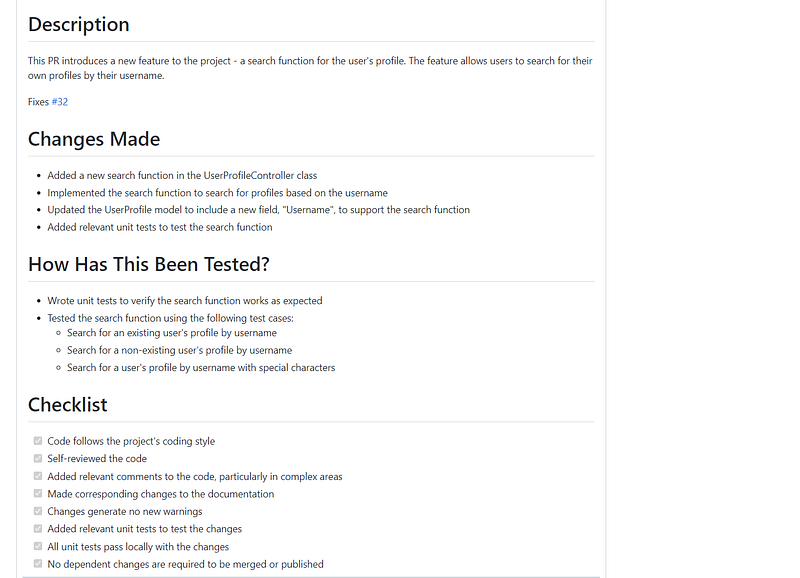
This PR provides a clear description of the changes made, explains how the changes have been tested, and includes a checklist to ensure that all necessary steps have been taken.
⚠️Note: Pull request templates can provide guidance, but are advisory only. That means developers will be able to create a PR that looks completely different than the template.
In conclusion:
Using Pull Request templates in GitHub can help you write better PRs and make the review process smoother for your team. They provide a standard structure for your PRs and ensure that all necessary information is included. By creating a Pull Request template, you can save time and effort and make the review process more efficient.
Thanks for reading!
Resources:
For more information, see " About issue and pull request templates." You can create a PULL_REQUEST_TEMPLATE/…docs.github.com