
Terms like cookies, sessions, and tokens are frequently tossed around, often creating confusion among users. While they all play a role in our online experience, they each serve distinct purposes.
Let’s start by breaking down each of these elements and understanding their roles in the authentication process.
The Login Scenario: Cookies and Sessions Working Together
Imagine logging in to your bank account. You enter your username and password, which are sent to the bank’s server for verification. Once confirmed, the server creates a session on its side, like a temporary workspace dedicated to you. It then sends you a cookie containing a unique session ID.
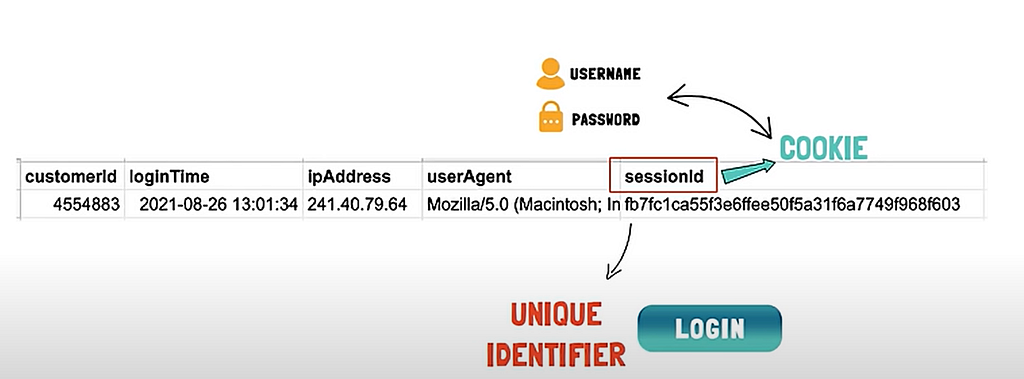
Cookie: A small file saved on people’s computers to help store preferences and other information that’s used on webpages that they visit. https://support.google.com/merchants/answer/2407785
Think of this session ID as a secret key for your login session. It’s similar to a gym membership card. The card stores your member ID, and when you scan it at the entrance, it verifies your membership and grants access. Likewise, the cookie with the session ID allows you to navigate the bank’s website without re-entering your credentials every time.
Session: is the term used to refer to a visitor’s time browsing a web site. It’s meant to represent the time between a visitor’s first arrival at a page on the site and the time they stop using the site.
https://hazelcast.com/glossary/web-session/
The crucial point here is that the actual session information, not your login details, is stored securely on the bank’s server. This is because cookies themselves can be tampered with. The cookie simply acts as a reference point for the server to look up your session data.
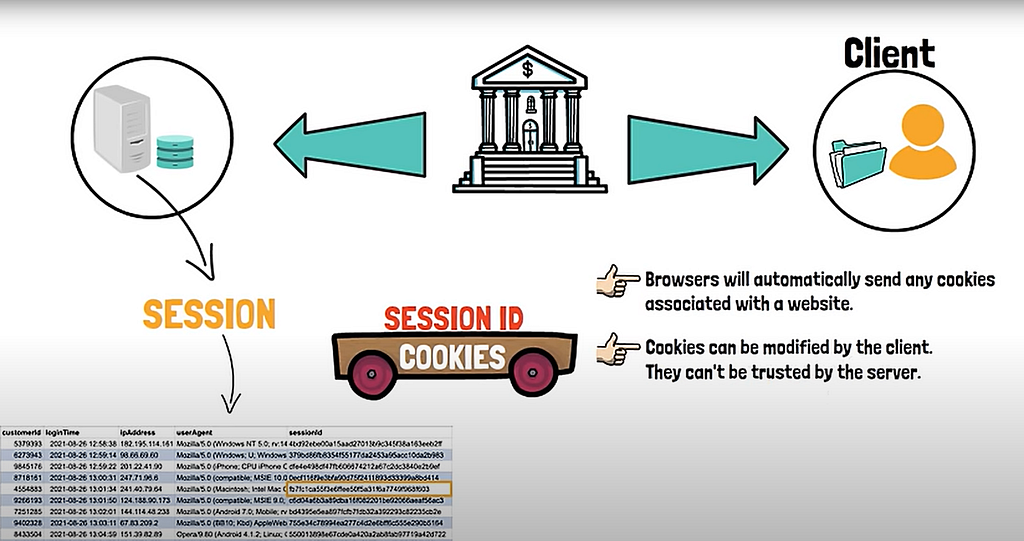
Your session will expire after a period of inactivity for security reasons. This is why you might get logged out after a while of being away from your bank account. Websites like social media platforms might offer longer-lasting sessions for convenience, while banking apps often use shorter sessions for added security.
Tokens: Sharing Data Securely with Third-Party Apps
Now, let’s say you want to connect a budgeting app to your bank account. Sharing your bank login credentials with a third-party app isn’t ideal. This is where tokens come in.
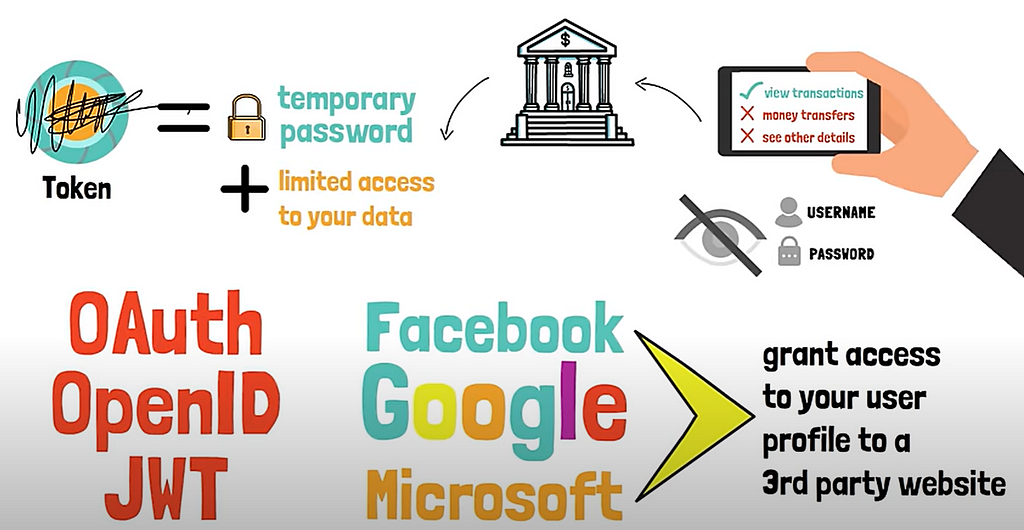
Here’s how it works: your budgeting app redirects you to your bank’s login page. Once authenticated, the bank might ask you to authorize the app to access specific data, like your transactions. Upon your approval, the bank generates a token. This token is like a temporary password, but with a twist — it usually grants limited access to specific data sets.
The token also contains important information like your customer ID, the scope of access granted (transactions in this case), and an expiry time. Additionally, this token is cryptographically signed, ensuring its authenticity and preventing anyone from tampering with it.
The budgeting app can then use this token to access your bank’s data without ever knowing your actual password. Tokens typically have a shorter lifespan than sessions and provide a more secure way to share specific data with third-party applications. They are also often sent through authorization headers instead of cookies, as they can be used in various applications beyond web browsers.
Key Differences Between Cookies, Sessions, and Tokens
Here’s a quick recap to differentiate these three:
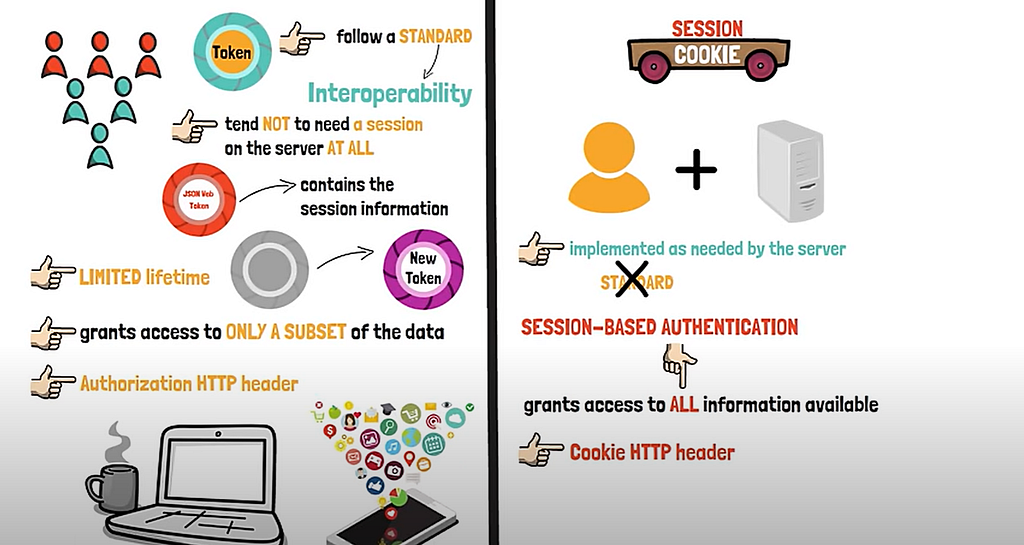
- Purpose: Cookies store data for a website (like website preferences), sessions manage user state on the server-side (like your login status), and tokens grant secure access to data for third-party applications.
- Storage: Cookies are stored on your device (client-side), sessions are stored on the server-side, and tokens can be stored on either side depending on the implementation.
- Security: Cookies are less secure due to potential tampering, sessions rely on server-side security, and tokens are cryptographically signed for enhanced security.
- Data Access: Cookies can store various data, sessions manage all user data within that session, and tokens typically grant access to specific data sets.
- Lifetime: Cookies can have varying lifespans, sessions expire after inactivity, and tokens have pre-defined expiry times.
When to Use What
Both cookies and tokens have their advantages. Session-based authentication with cookies is still widely used for traditional web applications. Token-based authentication is preferred for mobile apps and scenarios involving multiple parties. Often, a combination of both approaches might be used, with cookies managing the user session within a website and tokens facilitating secure data access with third-party applications.
In conclusion, cookies, sessions, and tokens play distinct yet complementary roles in the authentication ecosystem. While cookies facilitate seamless browsing experiences, sessions and tokens offer enhanced security and versatility, ensuring that users’ interactions with websites and applications remain both convenient and safeguarded.
Thank you for reading! See you next time.
Sources:
Inspired by and images are from:
https://www.youtube.com/watch?v=GhrvZ5nUWNg